

Rich Event Data
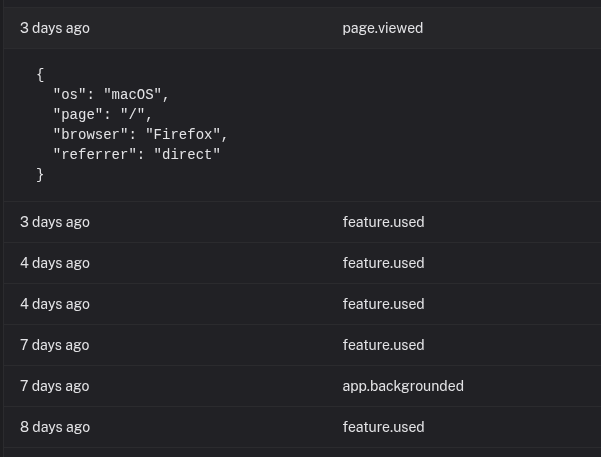
Attach any JSON data to your events. Track user details, metadata, custom properties. Click any event to see the full context.
How it works
Every event can carry a JSON metadata payload: user details, transaction amounts, error stacks, feature flags, referral codes. If you can serialize it, you can attach it.
Click any event in your dashboard to see everything: name, description, timestamp, channel, and the full metadata with syntax highlighting. No truncation.
Most event tracking tools force you into rigid schemas or limit what you can attach. You end up with events that tell you something happened, but not enough to understand why it matters or what to do next.
All metadata is indexed for full-text search. Find events by customer email, error message, or any value you attached.
What you get
- Free-form JSON metadata on every event with no schema requirements
- User object with dedicated fields for id, email, and name
- Reserved keys like revenue, status, and source for automatic formatting
- Full-text search across all event fields and metadata
- Syntax highlighting in the event detail view
- Export as JSON or CSV for analysis in other tools
What to include in your events
User context
Include user email, name, and ID. Click any event to see exactly who triggered it. Search by email to find all events for a specific customer.
Transaction details
Include amount, currency, plan name, and upgrade status on payment events. Use the revenue reserved key for automatic currency formatting.
Attribution data
Track UTM parameters, referral codes, and landing page variants. See which campaigns actually convert by checking the data attached to each signup event.
Context-rich events support better product decisions
Product event tracking is only useful when events carry enough context to explain what happened. Rich metadata turns a single action into a story: who triggered it, which plan they were on, what campaign brought them, and what happened next.
For teams running saas product analytics, this makes investigations and prioritization much faster. It also supports analytical crm workflows, because support and success teams can understand account behavior without asking engineering to reconstruct logs.
Try it out
Attach the data that matters. Find it when you need it.